Tyres play a critical role in machine performance, safety, and operating costs. The new TPMS (Tyre Pressure Monitoring System) gives fleet managers and operators greater visibility of tyre health, helping them identify issues early and take action before they impact productivity.
New Loadall machines come with continuous monitoring of tyre pressure in the LiveLink platform, TPMS provides real-time alerts whenever tyre pressures fall outside expected levels. Rather than relying on manual inspections to spot potential problems, you can quickly identify underinflated or overinflated tyres and address them before they lead to increased wear, reduced fuel efficiency, or unexpected machine downtime.
By providing early visibility of tyre-related issues, TPMS helps businesses take a proactive approach to maintenance. Repairs, replacements, and servicing can be scheduled at the right time, reducing the risk of costly breakdowns and minimising unplanned downtime.
KEY BENEFITS
IMPROVE PROFITABILITY
- Reduce tyre wear and extend tyre life.
- Prevent costly tyre failures and machine downtime.
- Identify issues early to lower maintenance costs
- Gain visibility of tyre health across customer-operated rental machines, enabling proactive fleet management
ENHANCE SAFETY
- Receive instant alerts when tyre pressures move outside recommended ranges.
- Help reduce the risk of tyre-related incidents in the field.
- Support safer machine operation through continuous monitoring.
SUPPORT SUSTAINABILITY
- Maintain correct tyre pressures to improve machine efficiency.
- Reduce unnecessary tyre replacements and waste.
- Extend the lifespan of tyre assets across your fleet.
STAY AHEAD OF TYRE ISSUES
TPMS helps you move from reactive maintenance to proactive fleet management. By continuously monitoring tyre pressure and providing actionable alerts, you can keep machines working efficiently, improve safety, and maximise the value of your tyre investment.
HOW TO USE TPMS IN LIVELINK
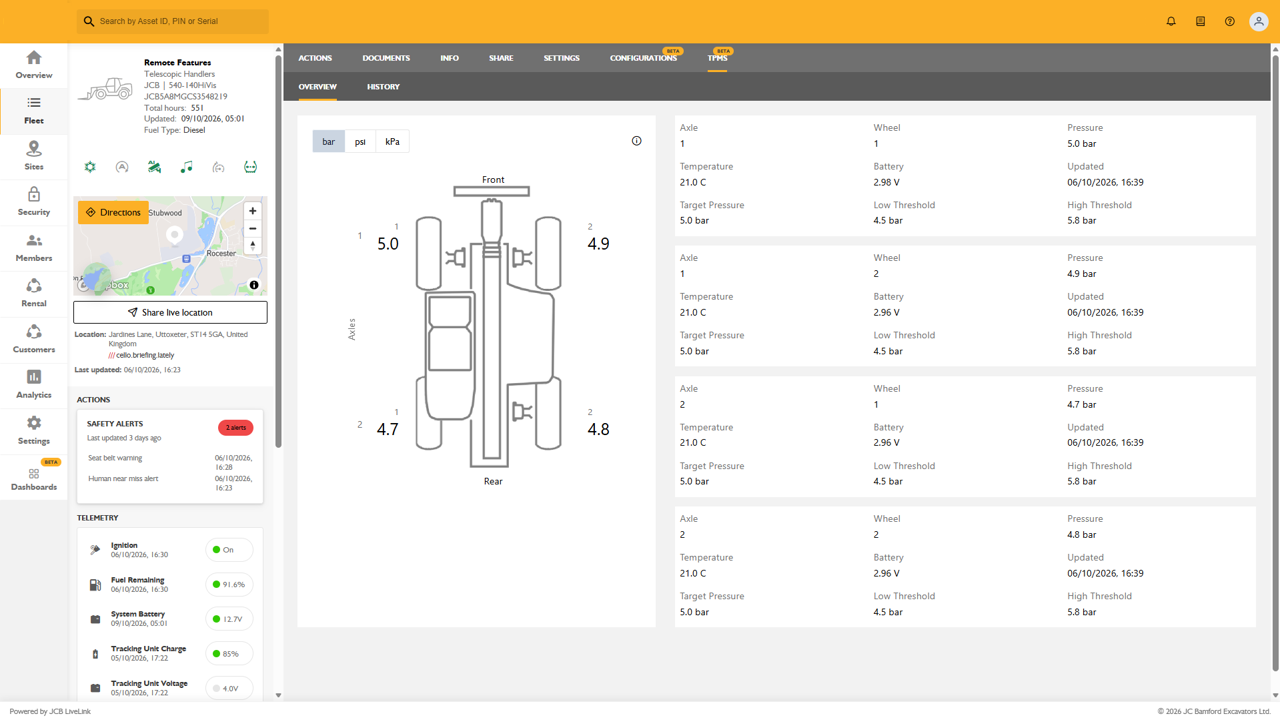
TPMS can be accessed directly from the Machine Page in LiveLink, giving you a clear view of tyre pressure and temperature data for each wheel on a machine.
ACCESSING TPMS
- Open the required machine from your fleet.
- Select the TPMS tab from the machine navigation menu.
- The Overview page will display the current tyre status for all monitored wheels.
TPMS OVERVIEW
The Overview page provides an at-a-glance view of tyre health across the machine:
- View the current pressure for each tyre in bar, psi, or kPa.
- See tyre positions displayed on a machine diagram for quick identification.
- Review key information for each wheel, including:
- Current pressure
- Current temperature
- Target pressure
- High and low pressure thresholds
- Sensor battery status
- Last update time
This allows operators and fleet managers to quickly identify tyres that may require attention without carrying out a manual inspection.
VIEWING HISTORICAL TYRE DATA

To investigate trends or diagnose potential issues:
- Select the History tab within TPMS.
- Choose your preferred pressure unit (bar, psi, or kPa).
- Select a time range:
- 1 Day
- 1 Week
- 1 Month
- Expand the required axle and wheel section to view detailed charts.
The history view displays:
- Pressure trends over time
- Temperature trends over time
- Target pressure levels
- Configured high and low pressure thresholds
This makes it easy to identify gradual pressure loss, recurring pressure issues, or temperature changes that could indicate developing tyre problems.